

How to plan employee work schedules?
.svg)
What is this feature for?
There is an option that allows you to schedule your employees' work hours. This option simplifies time management, optimizes productivity, and ensures a more equitable distribution of work hours within your company.
Steps to follow:
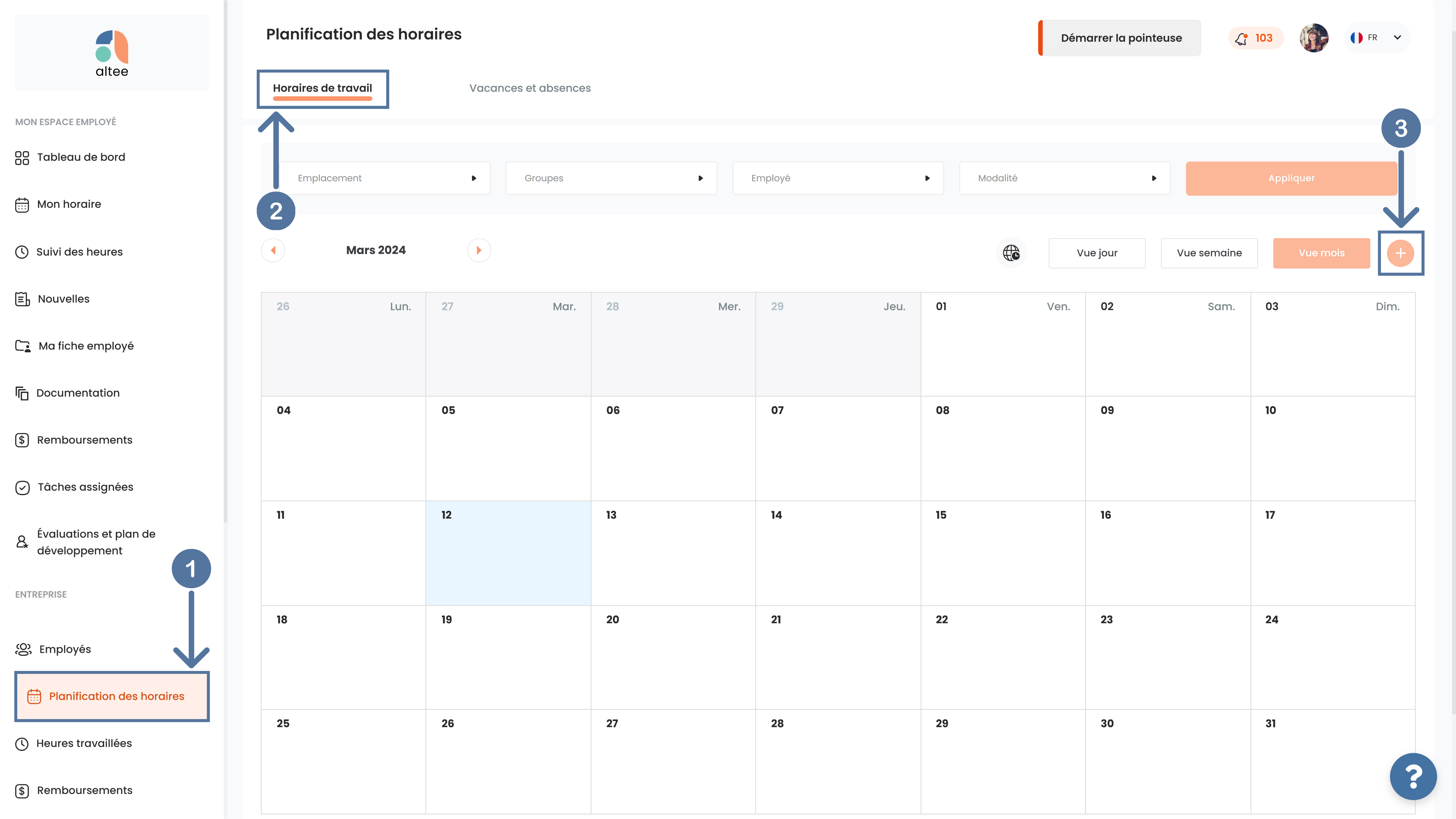
- First, go to the Schedule Planningmodule, in the Work Schedules tab, and click the plus button on the right.
- Fill out the form with the necessary information and then click Add.
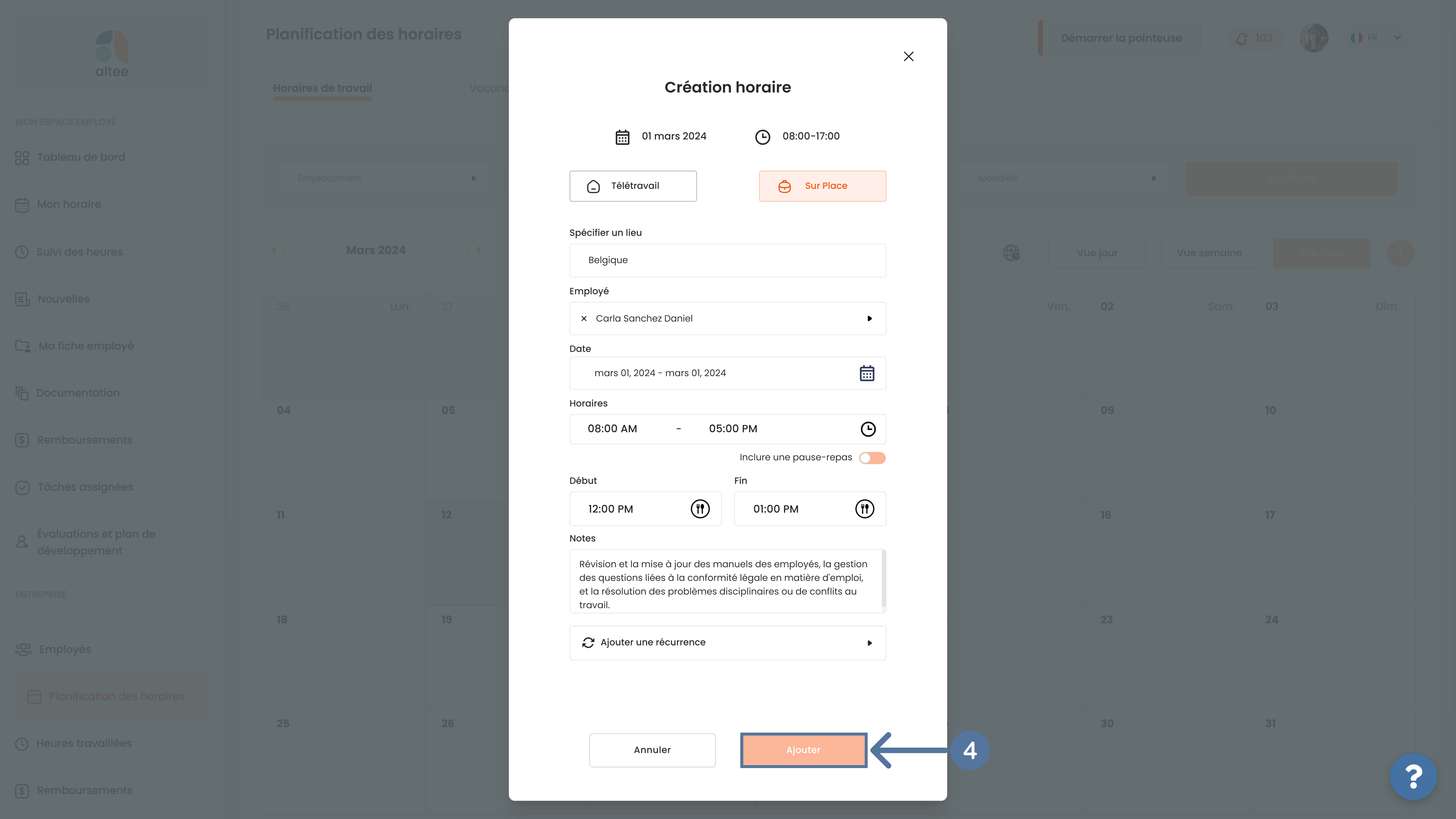
- All schedules you have created will appear on the Dashboard and will be visible to the relevant employees.

Notes:
- You can select multiple employees and assign them the same work hours.

- If your company has multiple locations, you can choose the appropriate time zone for each location. To do this, simply click the globe icon and then select the appropriate time zone.


- You will not be able to select a date range because it must not exceed 24 hours. However, thanks to the Add Recurrenceoption, you will be able to schedule your employees' hours over several weeks, including date ranges.
How to add a recurrence?
- Fill out the schedule creation form, and then click Add Recurrence.

- Select the days of the week you are interested in and the recurrence frequency. Don't forget to select the recurrence end date.
- Once you are satisfied, click on Add.


Note:
Regarding the recurrence frequency, if you want the work hours to appear every week in the calendar, select 1 week. If you want the work hours to appear every 2 weeks, select and so on.
How to modify or delete the schedules you have created?
To modify or delete an employee's schedules you have created:
- In the Work Schedulestab, click on the option, Day View or Week View. Then, tap on the profile picture of the employee concerned.

- Modify the information you are interested in and finally, tap on Save.

- To delete, simply click on Delete Schedule.

Notes:
- You will not be able to change the dates.
- If you have added a recurrence, you will have access to the option Edit recurring event which allows you to modify this event, subsequent events, or all events at once.
- To do this, simply follow the same previous steps and select the events you want to modify. Finally, press Save.


- To delete one or more events, select one of the three options under the Edit recurring event and click on Clear schedule.

Saviez-vous que ?
L’engagement des employés ne se limite plus à la satisfaction au travail. Aujourd’hui, il influence directement la performance, la rétention des talents, la collaboration interne et la capacité d’une entreprise à évoluer durablement.
.avif)
.avif)
Truc de pro
L’engagement des employés se construit au quotidien. Une communication claire, des objectifs bien définis et des feedbacks réguliers ont souvent plus d’impact sur la motivation qu’une simple évaluation annuelle.
Vous ne trouvez pas ce que vous cherchez ?
.svg)

Choose the best way to discover Altee
Whether you want to explore your needs, see the platform in action, or get started right away, we support you every step of the way.
.svg)
Exploratory Call
A quick 15 minute conversation to understand your HR challenges and identify the right solutions for your organization.
Schedule a callPersonalized Demo
Discover the full platform (HRIS + ATS) or explore only the modules that matter most to you.
Book a demoCreate a Company Account
Get started instantly with a free company account set up in less than a minute.
Create an account